Building the AI system for B2B marketing: memory, agents, and monitoring, with our receipts
We spent about 110 pull requests building a queue for AI agents, then retired it. Here is what we kept, how we decide what an agent can do, and how to cost a similar system for your team.
Start with a recurring job your team knows well. Write down the decisions it depends on, name the person who checks them, and give the job a repeatable method. Then try one supervised agent in the tracker you already use. We learnt that order by building a queue that took about 110 pull requests before we replaced it. This guide shares the rules we kept, a monitoring specification, and a worksheet that counts the time people spend checking the work alongside the software bill.
110 pull requests and a gate stuck at 2 out of 10
This summer I made the most expensive mistake of our whole build, and I made it with my eyes open.
We wanted our AI agents to take tasks from a shared queue, so work could move between tools without me carrying it by hand. I decided we would build the control plane ourselves: the machinery that hands out tasks and records what each agent did. It is also what stops two agents taking the same task. We built it on top of ClickUp, our project tool, with our own locks and checks.
Over three and a half weeks, about 110 pull requests (a pull request is one proposed change to the code) went mostly on that control plane debugging itself. One family of defect in the validator, the code that checks each task record, turned up 7 times. At one point the system sat in a deadlock for 13 hours, two parts each waiting for the other. Other nights it stalled until morning. After three and a half weeks, the promotion gate, the proof we actually wanted from the system, still sat at 2 out of 10.
On 4 August we retired it. We moved the queue to Linear and kept almost none of our own machinery: the tracker holds the truth, agents update their own tasks, a stall is a timeout, and each run takes one task.
Copy the reference design before you try to improve it.
Why this is hard
Expectations run well ahead of what has been deployed, and agents can only work with the context a team has written down.
In Gartner’s May 2026 survey, marketing leaders expected AI to handle 36% of marketing work by 2028, up from 16% in 2026. A separate Gartner forecast put the share of brands using agentic AI for one-to-one interactions in 2028 at 60%. Both figures look ahead.
Surveys of current deployment tell a different story. Stanford's 2026 AI Index found AI agent deployment "in the single digits across nearly all business functions". McKinsey's 2026 survey found 40% of respondents from large organisations, those with annual revenue above $1 billion, reporting that they were scaling AI agents, up from 27% a year earlier; among smaller organisations the share stayed flat at 22%. Most of the companies we work with sit in that smaller group. Where agents are running, many disappoint. Of martech leaders with agents in pilot or production, 45% say vendor-offered agents fall short of the business performance they were promised. Gartner predicts that over 40% of agentic AI projects will be cancelled by the end of 2027, with escalating costs and unclear business value among the reasons.
Gartner’s cancellation estimate is a forecast. The deployment figures describe what survey respondents said their organisations had already done. When we decide whether to build something, we give more weight to what teams can run today than to what they expect to run in two years.
Why are they not? Guide 1 described the gap between people and organisations: 80% of people using AI at work say it has improved their own productivity, while only 37% of respondents say AI has contributed positively to their organisation's EBIT (operating profit). Part of the cause is human, and Guide 1 covers that. Part of it is mechanical. Language models work with a finite attention budget, and Anthropic's engineers describe "context rot": as the amount of text in the context window grows, the model's ability to recall any of it accurately falls. Good context engineering therefore means "finding the smallest possible set of high-signal tokens" for the job. Finding the right words matters less; the work becomes deciding "what configuration of context" produces the behaviour you want.
That turns an AI problem into a records problem. A team that has never written down its positioning and its decisions has nothing small and high-signal to give a model. Every workflow starts from zero, which, as we wrote in April, is why most AI adoption in marketing plateaus. Agents make it worse. An agent runs many steps on whatever context it starts with, and nobody reads each step. That is why we built the context before we added autonomy.
None of these studies isolates UK firms or mid-sized companies. McKinsey's split by revenue is the closest we have.
The framework: memory, method, execution, watch
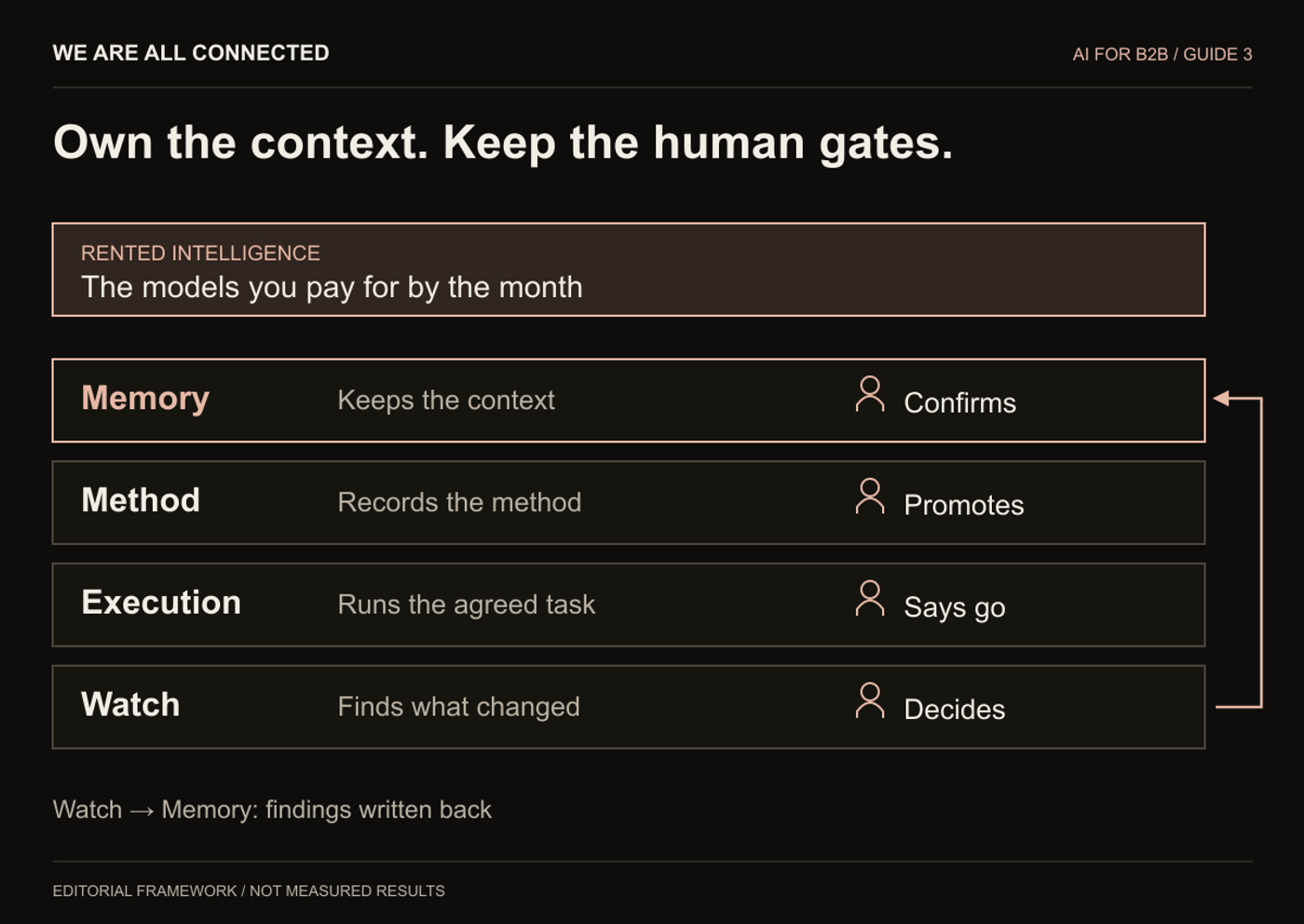
Nate Jones named the pattern we build on. He calls it the Open Stack: rent the intelligence, and own the context underneath it, in three layers. Our builds of those layers are Open Brain for memory, Open Skills for method, and Open Engine for execution. We did not invent the framing. We add a fourth layer from our own experience: watch, the monitoring that tells you when something has changed, including how AI assistants describe you.
Each layer has one job and one human gate.
Layer: Memory
Its job: Stop every task starting from zero
What it holds: Decisions, findings, contacts, meetings, and methods, each with its source
The human gate: A person confirms an entry before agents treat it as an instruction
Layer: Method
Its job: Make good work repeatable
What it holds: Skills and house rules, including research contracts
The human gate: A person promotes a method; agents can only propose one
Layer: Execution
Its job: Move bounded work without a person relaying it
What it holds: Tasks in a tracker, each with an owner, a status, a boundary, and a receipt
The human gate: New work starts on a person's go; anything client-facing waits for approval
Layer: Watch
Its job: Say what changed and whether it matters
What it holds: Live detection rules and alerts for human review. An assistant answers questions about alerts. AI interpretation of each alert is planned.
The human gate: A person decides what to do about each finding
Agents without a written method improvise, and a method without memory produces generic work. Build from the top of the table down, and only build the next layer when the one above it hits a wall.
Step 1: Build the memory first
What it is and its job
The memory, or knowledge layer, is a database of what your team knows that any AI tool you use can search. Ours, Open Brain, is a semantic knowledge base that holds voice samples, client conversations, decisions, and patterns, queryable by any AI through MCP. (MCP, the Model Context Protocol, is the standard way to connect an AI assistant to another system.) Under the hood it is Supabase with pgvector and a custom MCP server, organised as six tables, one for each kind of knowledge.
Its job is narrow. When a person or an agent starts a task, the memory hands it the facts that apply: what we decided and what we ruled out, with the reason.
What the vendors and the data say
The vendors agree that memory matters, and each keeps it inside its own product. ChatGPT's shared projects draw on a team's own files and instructions, and use project-only memory that "cannot access an individual member's memories or context from outside the project". Anthropic's Agent Skills load only a name and a description at the start and pull in the rest when a task needs it, a design meant to keep context small. Google says NotebookLM can now find and organise web sources into a research collection. Each is built first for its own vendor's tool, so a team that works across several tools ends up with several partial memories and a person carrying context between them. That is the case for owning the layer underneath.
The research case comes from context engineering. Recall degrades as context grows, so the job is to give the model less, and better.
What we could not find is an independent study that measures how much a persistent knowledge layer improves marketing output.
What we built, and what it costs to keep honest
On 10 October 2026 Open Brain held 3,076 entries, up from 849 at the end of March and 2,232 in early July. In that 10 October snapshot, about 86% of entries carried a "needs confirmation" flag. We could use 108 as instructions, up from six in July.
When we wrote a major report, we could look up earlier decisions and the reasons for them. Nobody had to reconstruct the project from old meeting notes. We haven’t measured how many hours that saved.
The running cost is confirmation: a person's time spent checking entries before agents lean on them. Our working rule is to confirm on use. An entry gets checked when someone, or some agent, relies on it for real work. Agents prepare the clean-up, and a person approves it row by row.
What didn't work: clearing the confirmation queue in one go. We captured freely at first, and six months later an entry with no source looked exactly like a guess. The October backlog was the cost of doing that. We tried to clear the backlog in a single push and gave up; there was too much of it, and new entries kept arriving. Confirm-on-use is slower, and it holds up.
Artefact: the six-table schema is already published in our Open Brain blueprint from April 2026. Use it as your starting design. If a database is too much for now, start with the two shared lists Guide 1 suggests, approved claims and decisions, each with a source and a last-checked date.
Step 2: Write down the method
What it is and its job
Memory holds what you know. Method holds how you do things: what a task is, what good looks like, which sources count, where an agent must stop, and what proof it owes before anyone trusts the work. Without it, every agent improvises, and quality depends on whoever wrote the prompt that day.
The format Anthropic has settled on is the skill. Anthropic describes Agent Skills as "organized folders of instructions, scripts, and resources that agents can discover and load dynamically to perform better at specific tasks". Only the name and description load at the start; the body loads when a task calls for it, so a large library does not crowd the model's context.
What we built
Our method layer is a library of skills plus written house rules that every AI-drafted piece must pass. The writing rules and a growing blocklist of AI tells catch prose that reads as machine-made, and Guide 1 describes how we use them. Above those sits our guide standard. Every flagship guide must show the working stack, include primary data, end with an artefact a reader can use the same day, and "contain at least one number nobody else has published".
The research contract is the method we lean on hardest, and it is the method behind this series. Each run starts with a written contract: the question, the sub-questions, the source rules, and the budget. Every page we cite is saved as text. Every claim becomes a row in a ledger, tagged by tier and graded by source quality. Each row is quote-locked, which means its quote must appear word for word in the saved page or the row fails. Scripts then audit every citation and every number before a draft may use them, and a second model re-reads the most important rows against the saved sources. The writer, human or AI, may cite only rows in the ledger; where a fact is missing, the writer flags the gap with a marker and leaves it unfilled.
That sounds heavy. In a spreadsheet it is a morning's set-up, and Artefact C is the version a marketing team can run this week.
What didn't work: trusting our own first wording. Seven findings in this series mattered enough to check twice. An independent reviewer sent four back for more precise wording. Each change was small, but even a small error spreads when people or agents reuse a summary. Our writing rules could not catch that kind of drift. A second reader did.
Step 3: Run agents under a tracker that holds the truth
The plumbing is ready
The connectors are now standard. On 9 December 2025 Anthropic donated MCP to the Agentic AI Foundation, a fund under the Linux Foundation co-founded by Anthropic alongside Block and OpenAI, with support from Google, Microsoft, AWS, Cloudflare, and Bloomberg. At the time Anthropic reported more than 97 million monthly downloads of the official MCP SDKs (software development kits) across Python and TypeScript. OpenAI offers an Agents SDK to "control the agent loop" with "reusable agents, tools, and handoffs".
Marketing platforms have followed. HubSpot's remote MCP server became generally available to all HubSpot accounts on 13 April 2026, with write access. It respects each user's existing permissions, so an assistant can only change what the connecting user could change. From 14 April 2026, HubSpot moved its Customer Agent and Prospecting Agent to outcome-based pricing, paid only when the agent completes its task: $0.50 per resolved conversation and $1 per lead recommended for outreach.
So connecting an agent to your systems is now a configuration job. The hard part is coordination: who assigns the work, and what happens when an agent stalls halfway through.
Our operating boundary
Our agents work under a supervised orchestrator. Hermes, the agent that coordinates our specialist AI seats, "is not approved as WAAC's sole unattended scheduler or unrestricted production operator". Hermes coordinates, and a person supervises. Some decisions never pass to it at all. New work starts when a person says go, and raw signals go to a review queue first, because we did not want a system that manufactured work for itself. Anything client-facing, any spend outside an agreed budget, any credential, and any deployment waits for a person's explicit approval.
The queue rules that replaced 110 pull requests
After the failure in the opening story, we rebuilt the queue on Linear, starting from Nate Jones's Open Engine design as written and drawing on OpenAI's Symphony. Four rules came out of it:
- The tracker is the authority. A task's state in the tracker is the truth. Comments are evidence for people to read, never locks.
- The orchestrator does less. Agents update their own tasks, following a versioned workflow prompt, so no central controller has to.
- Stalls are timeouts. If a task shows no progress for 15 minutes, it is released to a status that asks a person for input. There are no leases and no chains of continuation.
- One task per run. Each run takes one task, highest priority first, then oldest.
Each rule deletes a piece of machinery we had built ourselves and then had to debug. Artefact B sets them out as rules your team can adopt, with the reason for each.
Build or buy
You can start with the tools you have. In McKinsey’s 2026 survey, 32% of organisations said they had decided against buying at least one software product because they could build it with agentic coding tools. We built the memory, the queue, our own CRM, our project management system, and a headless crawler. We buy where a subscription covers the job at our volume. If a system talks directly to people in the EU, make clear they are interacting with AI. Article 50 of the EU AI Act sets out the provider’s duty and its exception where that fact is already obvious.
What didn't work: building a control plane before copying one. Over three and a half weeks, about 110 pull requests went mostly on the machinery debugging itself: 7 instances of one validator defect and a 13-hour deadlock, on top of overnight stalls. Each lock we added needed a check, and each check could fail in a new way. The pattern is wider than code. By one practitioner's account, Ramp shut down its AI SDR (sales development representative) programme in December 2025 after the returns from its automated funnel plateaued, even though that programme had generated 30% of its pipeline for years. Guide 1 tells that story, and a single secondary account is thin evidence. It matches our experience all the same: autonomy that nobody is watching at the right point stops paying.
Step 4: Watch what changed, with rules plus interpretation
The visibility category
A new category of tools tracks how AI assistants describe your brand. Peec AI says its product measures "how often your brand appears in answers from AI search engines like ChatGPT, Gemini, and Perplexity". Ahrefs sells Brand Radar to track brand visibility across AI answers as well as YouTube and Reddit. Those are the vendors' own descriptions of their own products.
The data underneath the category says one check is never enough. In Ahrefs' March 2026 study, 38% of pages cited in AI Overviews also ranked in Google's top 10. In Ahrefs’ November 2026 US sample, YouTube accounted for 24.5% of the citations to the top sources in its AI Overview ranking. In September 2025, ChatGPT suddenly began citing Reddit and Wikipedia far less often. Across 100 prompts, only 25.6% of cited domains overlapped between ChatGPT's minimal and high reasoning modes. Monitoring has to run repeatedly and across more than one assistant, or it measures noise.
What we found when we looked at the tools
In September we checked 160 vendor-product families and could verify 137 on their vendors’ sites. Our own visibility tracker ran about 4,500 checks a month at a measured model cost of $284. The self-serve plans we priced that month were $99 to $189, before we counted any of our time. A buyer weighing those options today should quote for the same prompts, models, and frequency.
The monitor pattern
Our Early Warning Monitor uses rules to flag changes for a person to review. An assistant can answer questions about the alerts. Automatic AI interpretation of each alert is the design we work to. The four steps below show how to specify that design.
For a monitor of your own, give each part a clear job.
- Detection. Compare a scheduled crawl or data pull with a stored baseline. Give each alert a reason and a severity.
- Interpretation. Ask a model to read the alert alongside its history and the relevant page notes. Have it say whether the change looks real, looks like noise, or needs a person, and give one reason.
- Review. Group the alerts into a digest. A named person decides which ones need action and what a client should hear.
- Memory. Record confirmed findings and decisions. The next reviewer can see what happened the last time the same alert fired.
The fourth part is what makes watch a layer of the system rather than a tool on the side. Every confirmed finding makes the next interpretation better informed.
The baseline measure
Start in GA4’s traffic acquisition report. The AI Assistant channel groups visits referred by assistants such as ChatGPT, Gemini, DeepSeek, Copilot, and Grok. Visits from Google’s AI Overviews and AI Mode sit in Organic Search. Guide 2 shows how to use the report. Our dashboard guide shows how to keep daily snapshots.
What didn’t work: building before pricing the alternatives. Our own tracker cost us more in model spend than the subscriptions we priced in September. The time to cost that comparison was before we built it. We also learnt to review alerts as a batch. When people keep opening false alarms, the next real one is easier to miss.
Step 5: Work out what it costs
Most of an AI budget now sits in four lines: seats, outcomes, model spend on your own builds, and the senior time that directs it all.
Seats. For teams of two to 150, a standard Claude Team seat costs $20 a month on an annual subscription or $25 on monthly billing. Premium seats include five times the standard usage and cost $100 or $125 respectively. On the individual plan, Claude Max starts at $100 a month. Prices checked on 17 November 2026, before applicable tax.
Outcomes. HubSpot’s published rates are 50 credits per resolved conversation and 100 per lead recommended for outreach. At the dollar rates in its April announcement, that was $0.50 and $1 respectively. Agree what counts as a resolution or recommendation, and review a sample each week.
Model costs. In our September comparison, 4,500 monthly visibility checks cost about $284 in model use. Compare that bill, plus the time someone spends maintaining the tracker, with a quote for the same coverage.
People. We think AI has removed the need for junior execution roles, and what is needed is senior judgement to direct the tools. There are fewer hours of doing, and more hours of a senior person confirming memory entries, approving methods, reading digests, and answering the questions agents raise. We do not yet have a clean figure for those hours, or for cost per run.
Running costs do bite. In McKinsey's 2026 survey, about 20% of respondents said AI-related operating costs, including token costs, had constrained their AI use. Artefact D is a worksheet that puts all four lines on one page, with our figures as worked examples and blanks for yours.
Step 6: Build it in order
First month: memory for one job. Pick the one recurring job you are tired of re-explaining. Write down its approved claims and its decisions, with sources, in one shared place that every tool you use can read. Name the person who confirms entries.
Second month: the method for that job. Turn the way you do it into a single skill: purpose, inputs, steps, output, and the check a person runs. Run it by hand until the reviewer stops correcting it.
Third month: one agent, one queue. Put the job in a tracker your team already uses, and adopt the queue rules in Artefact B as written. One task per run, a timeout on every stall, and a person's go before anything ships.
Alongside all three: watch. Set up the GA4 AI Assistant report in the first week. Add a monitor only when you have something worth watching and a person who will read the digest.
If a layer never hits a wall, you did not need the next one.
The real numbers
- 3,076 entries: 86% unconfirmed, 108 instruction-grade. Open Brain on 10 October 2026, up from 849 entries at the end of March; instruction-grade entries were 6 in July.
- About 110 pull requests, gate at 2 out of 10. What our first agent control plane cost over three and a half weeks, mostly spent on the machinery debugging itself.
- About $284 for 4,500 checks in a month. Our September measurement covered model spend. The self-serve plans we compared then were $99 to $189.
When not to do this
If nobody owns confirmation, wait before building a memory. An unsupported entry can look just as authoritative as a checked one. In our 10 October 2026 snapshot, about 86% still needed confirmation. We now check entries as we use them.
If your tracker is not the single source of truth for task state, do not run agents off it. Our first version kept its own locks on top of the tracker, and most of three and a half weeks went on debugging them.
Tell people when they are talking to an AI agent. If you cannot do that reliably, resolve it before you put the agent in front of customers.
If a subscription covers your volume and owning the build gains you nothing, buy it.
And if what you want is an AI that goes off and does the work unwatched, this is the wrong guide. Ours has more room than it had in the summer, but only inside fences, and only after each step proved itself.
Where to start
Pick one recurring job. Build the memory for it and write down its method. Only then let an agent near it, under a tracker that holds the truth and a person who says go.
You can book a 30-minute call to talk through the costs for your team, or get the newsletter for the next build report.
We researched and drafted this guide with our own AI system. We checked its claims against the evidence ledger. Robin Dally signed off the original text on 26 October 2026.
Artefacts
A. Monitor specification (one page)
Use this to specify a marketing monitor before anyone builds or buys one. It follows the design rule in Step 4: rules detect, AI interprets, and a person decides. The daily snapshot store underneath it is the one described in Guide 2 (the dashboard pattern and Artefact B there); this spec covers what sits on top.
Header (fill in once)
Field: Monitor name
Your answer: [e.g. "Site health, main domain"]
Field: What it watches
Your answer: [pages, metrics, AI answers to named prompts]
Field: Schedule
Your answer: [daily, weekly]
Field: Baseline store
Your answer: [where yesterday's values live; one row per item, per metric, per day, never overwritten]
Field: Owner (keeps the rules current)
Your answer: [name]
Field: Digest reader (makes the decisions)
Your answer: [name, and a named deputy]
Field: Where findings are written back
Your answer: [your memory, or a shared findings list]
Layer 1: rules (detection). Simple, explainable checks. Rules never send anything to anyone directly. Each rule has a plain-English reason written beside it, so the reader knows why it exists.
Field each alert produces: alert_id
What it holds: Unique ID
Field each alert produces: detected_at
What it holds: Date and time of the run
Field each alert produces: item
What it holds: The page, query, prompt, or metric
Field each alert produces: rule
What it holds: Which rule fired, by name
Field each alert produces: baseline_value
What it holds: What the store held last time
Field each alert produces: current_value
What it holds: What this run found
Field each alert produces: change
What it holds: The difference, as a number and a percentage
Field each alert produces: severity
What it holds: High, medium, or low, set by the rule
Field each alert produces: evidence
What it holds: Link to the crawl row, export, or saved answer
Layer 2: interpretation (AI). A model reads each alert with its history and what your memory already knows about the item. It may only use the figures it is given. Guide 2's anomaly triage prompt is a good starting point; add the memory lookup and the fields below.
Field each interpretation produces: alert_id
What it holds: Links back to layer 1
Field each interpretation produces: verdict
What it holds: Likely real, likely noise, or needs a person
Field each interpretation produces: reason
What it holds: One sentence, using only figures from the inputs
Field each interpretation produces: probable_cause
What it holds: A short cause, or "cause unknown"
Field each interpretation produces: memory_used
What it holds: IDs of the memory entries it relied on, and whether each is confirmed
Field each interpretation produces: suggested_check
What it holds: One thing a person could look at to confirm
Layer 3: the digest gate (a person). One digest per run, grouped by verdict, with "needs a person" first. Nothing leaves the digest without the reader's name against it.
Field the reader fills in: decision
What it holds: Act, watch, dismiss, or escalate to the client
Field the reader fills in: owner
What it holds: Who does the next thing
Field the reader fills in: due
What it holds: When
Field the reader fills in: note
What it holds: Why, in a line, especially for dismissals
Field the reader fills in: written_back
What it holds: Yes or no: has the confirmed finding gone into memory?
The human decision at the end. Every item gets one of the four decisions, a name, and a date. Dismissals with a reason go back to the owner, who retunes the rule that raised them. Confirmed findings go into memory with their source and date, so the next alert on that item arrives with its history.
Health checks (weekly, by the owner)
- Did every scheduled run complete? If a run fails, the digest says so; silence is not the same as "no alerts".
- Which rules produce mostly dismissals? Retune or retire them.
- Are verdicts of "likely noise" being spot-checked? Pick a few each week and look.
- Has the digest been read on every run? If not, the monitor is producing alerts nobody acts on.
B. Queue design rules for agents
Adopt these as written before you change any of them. They come from our own rebuild of the agent queue in August 2026, which started from Nate Jones's Open Engine design and drew on OpenAI's Symphony.
#: 1
Rule: The tracker's state is the only truth about a task.
Why: Two sources of truth will disagree, and agents act on whichever they read last.
#: 2
Rule: Comments are evidence for people, never locks.
Why: Locks built from comments need their own validator, and ours failed in the same way seven times.
#: 3
Rule: Agents update their own tasks, following a versioned workflow prompt.
Why: A central controller that edits every task becomes the thing you spend your time debugging.
#: 4
Rule: Version the workflow prompt and record the version on each run.
Why: When behaviour changes, you can see which instructions caused it.
#: 5
Rule: A stall is a timeout: no progress for 15 minutes releases the task to an "Agent Needs Input" status.
Why: A person sees it at once, and nothing is left holding a task it cannot finish.
#: 6
Rule: No leases and no continuation chains.
Why: They are machinery that can wait on itself; ours sat in a deadlock for 13 hours.
#: 7
Rule: One task per run, highest priority first, then oldest.
Why: A run juggling several tasks leaves half-finished state for the next run to untangle.
#: 8
Rule: New work starts on a person's go. Raw signals go to a review queue first.
Why: A system that creates its own work fills the queue with tasks nobody asked for.
#: 9
Rule: Anything client-facing, any spend outside budget, any credential, and any deployment waits for explicit approval.
Why: These are the actions you cannot take back.
#: 10
Rule: The orchestrator coordinates and is supervised; it is not an unattended operator.
Why: Coordination is where errors spread fastest, so it is where a person watches.
#: 11
Rule: Copy a reference design before improving it.
Why: We spent about 110 pull requests learning this.
Statuses your tracker needs: Ready, In progress, Agent Needs Input, In review, and Done. If your tracker cannot hold these as states, fix that before you connect an agent.
Each task record should carry: the source of the request, the owner, the status, the boundary (what the agent may and may not do), any blocker, and a receipt of what was done.
C. Research ledger template (spreadsheet version)
This is a smaller version of the ledger behind this series, built for a spreadsheet. Use it for any piece that will carry numbers: a guide, a board paper, or a pitch.
Tab 1: Ledger. One row per claim.
Column: claim_id
What goes in it: E001, E002, and so on. Never reuse an ID.
Column: question
What goes in it: Which of your research questions the claim answers
Column: claim
What goes in it: The claim in one plain sentence, in your words
Column: quote
What goes in it: The exact words from the source that support it
Column: publisher and title
What goes in it: Who said it, and where
Column: date_published
What goes in it: As shown on the source
Column: url
What goes in it: The live link
Column: saved_copy
What goes in it: Link to a saved copy (PDF, or text pasted into a doc)
Column: tier
What goes in it: Decision, finding, or context (see below)
Column: grade
What goes in it: A to D, for source quality (see below)
Column: independence_group
What goes in it: A label shared by sources that come from the same underlying data
Column: status
What goes in it: Candidate, verified, or failed
Column: quote_lock
What goes in it: Pass or fail: is the quote word for word in the saved copy?
Column: checked_by and date_checked
What goes in it: A name and a date
Column: notes
What goes in it: Sample, method, and anything a writer must not claim from it
Tiers
- Decision: a claim the piece will state as settled fact. It needs two independent source groups.
- Finding: a claim from a primary source, or from two sources.
- Context: vendor benefit claims without a method, predictions, and attitude surveys. Usable only with framing such as "Google says" or "Gartner predicts".
Grades. A for primary sources and peer-reviewed or well-described studies; B for credible sources with a thin method; C for restatements and trade press; D for vendor marketing with no method. A grade D row can only ever be context.
The quote lock. Paste the quote, open the saved copy, and search for it. If it is not there word for word, the row fails. A second person spot-checks a sample, and checks every row that will appear in a headline or summary.
Gates, in order, before anyone writes
- Quote lock: every row passes or is marked failed.
- Citation audit: every source cited in the draft has a row in the ledger and has passed its checks.
- Number check: every number in a cited sentence appears in the row it cites. Anything else is a rounding error or an invention.
- Stop rule: every decision row has two independent groups, and no decision row is in an open contradiction.
- Second reader: someone who did not write the rows re-reads the decision rows against the saved copies, and may reword them.
If an important fact is missing, mark the gap for the researcher and keep writing. A claim that still lacks evidence comes out before publication.
Tab 2: Contradictions. Columns: number, the conflict in one line, the sources on each side, status (resolved or carried), and what the piece will say. If two sources disagree, the piece says so before it makes a recommendation.
For scale: at the close of the writing phase the ledger behind this series held 186 rows from 106 sources, with 7 decision rows, built from 95 searches and 120 fetch attempts, and was checked twice. Yours can start much smaller and still catch the errors that matter.
D. Cost worksheet
Fill in your team’s quantities and prices. The Claude seat prices were checked on 17 November 2026. The HubSpot figures are from its April announcement, and the tracker costs are from our September comparison. Use a current quote for your own budget.
Line: Standard seats
Unit: per seat per month
Worked example from this guide: $20 billed annually, $25 billed monthly (Anthropic Team plan)
Source: Anthropic pricing
Your quantity: [ ]
Your unit price: [ ]
Your monthly total: [ ]
Line: Premium seats
Unit: per seat per month
Worked example from this guide: $100 billed annually, $125 billed monthly
Source: Anthropic pricing
Your quantity: [ ]
Your unit price: [ ]
Your monthly total: [ ]
Line: Heavy individual use
Unit: per person per month
Worked example from this guide: From $100 (Anthropic Max)
Source: Anthropic pricing
Your quantity: [ ]
Your unit price: [ ]
Your monthly total: [ ]
Line: Outcome-priced agent: conversations
Unit: per resolved conversation
Worked example from this guide: $0.50 (HubSpot Customer Agent)
Source: HubSpot pricing
Your quantity: [expected resolutions a month]
Your unit price: [ ]
Your monthly total: [ ]
Line: Outcome-priced agent: leads
Unit: per lead recommended for outreach
Worked example from this guide: $1 (HubSpot Prospecting Agent)
Source: HubSpot pricing
Your quantity: [expected leads a month]
Your unit price: [ ]
Your monthly total: [ ]
Line: Model spend on your own builds
Unit: per month
Worked example from this guide: $284 for about 4,500 AI visibility checks
Source: Our September comparison
Your quantity: [checks or runs a month]
Your unit price: [ ]
Your monthly total: [ ]
Line: Buy alternative for the same job
Unit: per month
Worked example from our September 2026 comparison: $99 to $189 for self-serve tracking tiers
Source: Our September comparison
Your quantity: [ ]
Your unit price: [ ]
Your monthly total: [ ]
Line: Owner's hours
Unit: hours per month × loaded hourly cost
Worked example from this guide: Not yet measured by us
Your quantity: [hours]
Your unit price: [cost per hour]
Your monthly total: [ ]
Line: Hosting and other tools
Unit: per month
Worked example from this guide: [your database, automation tool, tracker]
Your quantity: [ ]
Your unit price: [ ]
Your monthly total: [ ]
Line: Total
Unit:
Worked example from this guide:
Your quantity:
Your unit price:
Your monthly total: [ ]
Four questions to answer under the table
- Build or buy: for each thing you build, is "model spend plus owner's hours" lower than the buy alternative? If not, buy, unless owning it gives you something the subscription cannot, such as your own data or a workflow you can change.
- Outcome definitions: what exactly counts as a resolved conversation, or a recommended lead, for you? Who reviews a sample each week?
- Seat mix: who needs premium usage, and who would be fine on a standard seat?
- The people line: whose time confirms the memory, approves methods, and reads the digest, and is that time in someone's week?
Sources
- Gartner Survey Reveals Marketing Leaders Expect AI Automation of Marketing Work to Double by 2028
- Gartner Predicts 60% of Brands Will Use Agentic AI to Deliver Streamlined One-to-One Interactions by 2028
- The 2026 AI Index Report: Economy
- The state of AI in 2026: On the road to ROI
- Gartner Survey Finds 45% of Martech Leaders Say Existing Vendor-Offered AI Agents Fail to Meet Their Expectations
- Gartner Predicts Over 40% of Agentic AI Projects Will Be Canceled by End of 2027
- Effective context engineering for AI agents
- The Open Brain: a blueprint for agency-scale AI infrastructure
- Continuity: how we built an agency that never starts from zero
- Projects in ChatGPT
- Equipping agents for the real world with Agent Skills
- Do better research with NotebookLM
- Donating the Model Context Protocol and establishing the Agentic AI Foundation
- Agents (API guide)
- Remote HubSpot MCP server is now generally available
- Remote HubSpot MCP server now generally available with write capabilities
- HubSpot's Customer Agent and Prospecting Agent: Now you pay when the task is complete
- EU AI Act, Article 50
- Why Ramp Shut Down their AI SDR Program
- AI Visibility and Share of Voice Tracking (product page)
- Brand Radar (product page)
- Update: 38% of AI Overview Citations Pull From The Top 10
- The 50 Most-Cited Websites in Google AI Overviews (November 2026)
- The Most-Cited Domains in AI: A 3-Month Study
- Only 25% of cited sources overlap between ChatGPT's different reasoning modes
- Our review of 160 AEO products
- The AI playbooks B2B marketing teams actually run
- Default channel group
- We built a marketing dashboard we control, without API access to the main source
- Claude plans and pricing