The AI playbooks B2B marketing teams actually run: content and AEO, paid, CRM, reporting (with the prompts)
Content and AEO, paid media, CRM, and reporting: four practical playbooks, with the prompts and the checks that sit around them.
Four playbooks, one pattern. AI does the research, the structure, the first pass, and the monitoring; people check the facts and approve what goes out. Google says optimising for AI search is still SEO. Yet the pages its AI Overviews cite are less tied to the rankings than they were, and pages at position 1 are mostly human-written. Visits from AI assistants now have their own channel in GA4. HubSpot now charges per outcome for two of its agents. For the new AI campaign types and for AI lead scoring we found no independent evidence of uplift, so treat each one as a test. The wording of a prompt matters less than the context you give it.
A $284 lesson in pricing, from a study about tools
In early September we set out to answer a practical question: which AI visibility tool is worth buying? There are a lot of them. We used AI research runs to check each product against its vendor's own pages, and a person graded what came back. The merged directory came to 160 vendor-product families, and for 137 of them we had verified the product against the vendor's own domain or product pages. Along the way the study judged llms.txt, the proposed file meant to guide AI systems around a website, to be folklore.
We were also running our own tracker, which checks whether a brand appears in AI answers. At our volume, about 4,500 checks a month, the measured model spend was $284. That sounds cheap until you set it beside the self-serve tools at $99 to $189, which undercut our build before anyone counts the hours spent keeping it running. On cost alone, at our size, buying wins. We still build a lot of our own tools, from our CRM to our project management to a headless crawler, because what we build we own and can change. Our mistake was building before we had priced the alternative.
The AI did the reading at a scale nobody on our team could have matched. The value came from how the work was organised and who checked it. Choose the workflow first; the tool is the easier decision, and sometimes the answer is to buy the cheap one.
Why this is hard
The obvious first use, getting AI to write the content, is the one with the flattest results. Among B2B marketers using AI to create content, 39% said content performance had improved, while 34% saw no change. Productivity went up, with 87% of those marketers reporting it. Results mostly did not follow.
Semrush graded 42,000 blog pages with an AI detector and found that pages at position 1 had an 80.5% probability of being human-written, against 10% for AI-generated. Yet in Semrush's own survey, almost 45% of AI-content users said their SEO performance had improved over the past year, and only 6% reported a decline.
The same survey found 87% of SEO teams keep their content fully human-created or heavily human-led. The survey describes AI used inside a process people run; the ranking study describes pages that read as machine-written. The ranking study is correlational and depends on a detector that makes mistakes, but the direction is clear enough: AI helps when people lead, and detectably AI-written pages lose at the top.
The newer reasoning models punish muddled instructions: OpenAI warns that contradictory or vague prompts do more damage to GPT-5 than to other models, because it spends its effort trying to reconcile them. And the lever most teams pull, rewording the prompt, is the weaker one. Anthropic's engineers describe the work as finding which configuration of context produces the behaviour you want, rather than "finding the right words and phrases". In practice, that means the smallest set of high-signal material that gets the job done.
So the playbooks below spend less time on wording and more on two questions: where the context comes from, and who checks what the AI produces. Guide 1 made the case for starting with bounded tasks that a named person reviews. This guide is about what those tasks look like on a Monday morning.
The framework: research, structure, draft, check, approve, measure
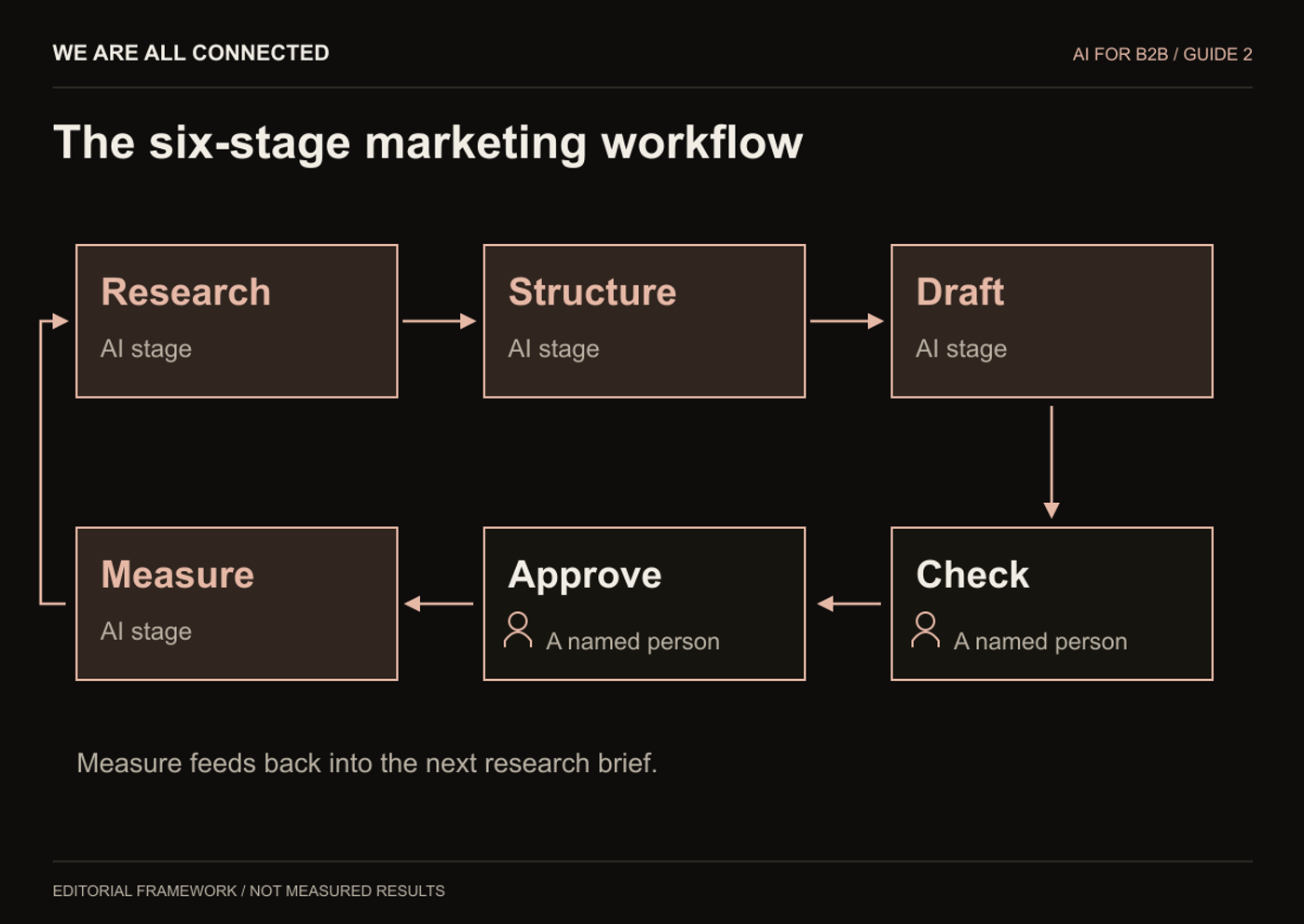
Every playbook in this guide runs the same six-stage loop. AI does the work on four stages. People own the other two.
Research (AI). Gather and summarise sources, with a link and a quote for every claim it keeps.
Structure (AI). Turn the research into an outline or a set of rules a person can read in two minutes.
Draft (AI, first pass). Produce the first version from the research and the structure only. Nothing it has not been given.
Check (people). A person verifies every number and claim against its source, and rewrites the parts that sound machine-made. AI can prepare the list of claims to check. It cannot sign the check off.
Approve (people). A named person decides it goes out, and their name is recorded with it.
Measure (AI). Watch what changed and feed it back into the next round of research.
Why put people on check and approve? Because that is where the evidence says the risk sits. Google says it is "critical to manually factcheck and review all AI-generated content for accuracy and trustworthiness before publishing". HubSpot's own report says brands "must build AI workflows with human approvals". The ranking data above says the person in the check stage has to do more than proofread. These two stages are where Guide 1's review gate lives, and its one-page policy says who staffs them.
What each stage means in the four playbooks:
Stage: Research
Content and AEO: Fan-out questions and sources
Paid: Offer and proof points
CRM and RevOps: Account history
Reporting: Last week's numbers
Stage: Structure
Content and AEO: Passage-first outline
Paid: Brief and variant plan
CRM and RevOps: Routing rules
Reporting: What counts as a change
Stage: Draft
Content and AEO: First-pass passages
Paid: Creative variants
CRM and RevOps: Suggested field values and routes
Reporting: Notes on what changed and why
Stage: Check
Content and AEO: Fact-check ledger, then a rewrite
Paid: Claims and ad rules
CRM and RevOps: Sample of records
Reporting: Figures traced to source
Stage: Approve
Content and AEO: Named editor
Paid: Named owner of the account
CRM and RevOps: CRM owner
Reporting: Report owner
Stage: Measure
Content and AEO: Citations and AI Assistant channel
Paid: Pipeline in the CRM
CRM and RevOps: Outcomes per agent
Reporting: Trend and anomalies
Step 1: Run the content and AEO playbook
What Google now says
Google's guide to its generative AI features is plain: "From Google Search's perspective, optimizing for generative AI search is optimizing for the search experience, and thus still SEO". The same foundational SEO practices apply. It explains the mechanism too. AI Overviews and AI Mode may use "query fan-out", issuing several related searches across subtopics to build one answer. Google says that content people find "unique, compelling, and useful" will likely influence your presence in the long run more than anything else in its guide. You do not need special schema markup, and chasing inauthentic mentions across the web "isn't as helpful as it might seem".
What the independent data says
The data disagrees with Google on how much rankings still decide. Ahrefs' March 2026 study of 863,000 keyword results and 4 million AI Overview links found that 38% of cited pages also ranked in the top 10. Its 2025 study put the figure at 76%. The two studies used different datasets and methods, and AI Overviews moved to a new Gemini model in January 2026. Still, ranking well no longer guarantees a citation.
The citations also go to places your blog is not. In US data for September 2026, YouTube took 22.9% of AI Overview citations and Reddit 18.5%. The sources move fast: in September 2025 ChatGPT suddenly started citing Reddit and Wikipedia far less often. Even one assistant gives different answers depending on how hard it thinks. Across 100 prompts, only 25.6% of cited domains overlapped between ChatGPT's minimal and high reasoning modes. That is a small sample, but it is enough to stop anyone reporting AI visibility from a single check of a single assistant.
Rank for the main query so you are in the pool, and answer each follow-up question that fan-out generates in its own clear passage, because those passages are what gets pulled. Then check across more than one assistant, more than once.
The workflow
- Map the fan-out (AI). For the topic, list the questions a model is likely to ask on the buyer's behalf, grouped by intent. Prompt A2 does this. A person cuts the list to the questions your company can answer with authority.
- Build the research brief (AI). Gather sources for each question, with a quote and a link for every claim. Prompt A1. Anything without a source is marked as missing, never filled in.
- Structure passage-first (AI). Each section heading is one question, and the first two or three sentences under it answer it outright. The detail comes after. This is the passage-first model we published in May 2026.
- Draft the first pass (AI). From the brief and the outline only. Prompt A3.
- Build the fact-check ledger (AI prepares, person checks). Prompt A4 lists every number, date, name, and quote in the draft beside its source. A person then opens each source and confirms it, including the parts nobody reads closely: titles, meta descriptions, structured data, and alt text.
- Run the AI-tells pass, then rewrite (person). Prompt A5 flags the words and patterns that read as machine-written. The writer rewrites those passages in their own voice and adds what only you know, such as the client story and your opinion.
- Approve (person). A named editor signs it off against Guide 1's review gate, the human approval HubSpot's own report calls for.
- Publish and measure. Track citations monthly across more than one assistant, and watch the AI Assistant channel in GA4 (Step 4).
What didn't work: llms.txt. In our tooling study it came out as folklore: a file widely recommended, with nothing behind the claims that AI systems use it. We stopped recommending it. The other trap is volume. Google warns that using generative AI to produce many pages without adding value for users may breach its spam policy on scaled content abuse. Fan-out tempts teams to write one thin page per question. Write one good page that answers the cluster.
The artefacts for this step are prompts A1 to A5.
Step 2: Run the paid playbook
What the platforms now do
The ad platforms have made AI the default setting. Google moved AI Max for Search out of beta in April 2026. From September 2026, legacy Dynamic Search Ads upgrade to AI Max automatically. Campaigns that use automatically created assets and broad match go first, and others follow from February 2027. AI Max's full feature set includes text customisation and final URL expansion, which means the platform writes ad text and picks landing pages for you. At Google Marketing Live on 20 May 2026, Google introduced Ask Advisor, a unified agent built with Gemini across its ads and analytics products, and announced ads inside AI Search.
Google says AI Max's full feature suite delivers an average of 7% more conversions or conversion value at a similar cost per acquisition or return on ad spend, compared with using search term matching alone. That is Google's claim about Google's product, with no published method, and Google's earlier figure was 14%.
On LinkedIn, Predictive Audiences combine your own first-party or third-party data with LinkedIn's modelling to build a high-intent audience, and they replace lookalike audiences. According to BrandRocket, LinkedIn retired Accelerate as a standalone campaign type on 4 August 2026 and moved its automation into ordinary campaigns.
What the independent data says
Nothing, for B2B. We looked for independent B2B results for Google's AI Max and Performance Max, and for LinkedIn's Predictive Audiences, and found none.
What we do know is that the rules have not moved. The ASA says its rules "apply regardless of how the content was created". If an AI tool produces something problematic, "the advertiser remains responsible for any output used in their ads", including output from a platform's own automated tools. When AI Max writes your ad text, you own it.
The workflow
- Write the brief before the creative (person, with AI research). The offer and its proof points, each claim with its source. AI can pull the proof points together from your approved claims list.
- Generate variants (AI). Ask for more headlines and descriptions than you need, each tied to one proof point from the brief.
- Check against the rules (person). Cut the list to a shortlist in which every claim traces to a source and nothing misleads. The platform's own generated assets get the same check as yours. Review the auto-generated text in the platform after launch too.
- Build audiences from first-party data (AI prepares, person approves). Clean the CRM list before you upload it, because Predictive Audiences start from your data. AI is good at finding duplicates and job-title mess; a person decides what goes in.
- Build the follow-up before you spend. Our LinkedIn campaign for the AEO guide spent about £269 on the account, about £40 of it on a paused website-visits ad set, for 9 real leads from the lead-form ads at about £25 each. The weak link was the follow-up and the guide delivery, as Guide 1 explains.
- Test new AI features against what you run now (person decides, AI measures). Run a switched-on feature beside your current setup for a fixed period, and judge it by qualified pipeline in your CRM, whatever the platform's own conversion count says.
What didn't work: trusting the platform's account of itself. We found no independent B2B evidence for any AI campaign type. Our research did not cover Meta's Advantage+. The 7% figure is Google's, and it has already changed once. Until someone outside the platform measures these features for B2B, run them as tests with your own CRM as the scorekeeper.
The artefact for this step is prompt A4, run on the ad copy, and Guide 1's review-gate checklist for UK advertising.
Step 3: Run the CRM and RevOps playbook
What the tools now do
HubSpot moved its Breeze Customer Agent and Breeze Prospecting Agent to outcome-based pricing on 14 April 2026, so customers pay only when an agent completes its task. The prices are $0.50 per resolved customer conversation and $1 per lead recommended for outreach, which HubSpot calls "among the most competitive in the market". The day before, HubSpot made its remote MCP server generally available to all accounts, with write access. MCP, the Model Context Protocol, is a standard way to connect an AI assistant to another system. This one means an assistant such as Claude or ChatGPT can now read and change records in your HubSpot.
Salesforce describes Agentforce Marketing as giving marketers "their own AI team". Its featured customer, the sporting goods brand Rawlings, reports 75% faster campaign creation. Both are vendor statements, and the featured customer is a consumer brand.
What the independent data says
We found no independent outcome evidence for AI lead scoring or for AI enrichment tools. Among B2B marketers experimenting with agents, 19% flagged data quality or compliance problems. Guide 1 told the story of Ramp, which closed its automated outbound programme after returns plateaued, even though that programme had generated 30% of its pipeline for years. The UK Data (Use and Access) Act widens the lawful bases you can rely on for significant automated decisions about people, subject to safeguards. If an AI decides who gets contacted and who does not, those safeguards apply to you.
The workflow
Do not start a step until the one before it has run cleanly for a few weeks.
- Connect read-only first (AI reads, nobody writes). Connect an assistant to the CRM through MCP with access that can only read, and keep write access off for the first month. HubSpot's server respects the connecting user's existing permissions, so connect it through a user account with view-only rights. Use it for account summaries before calls and for finding records with gaps.
- Turn enrichment into a review queue (AI proposes, person approves). The assistant suggests a value for a field, with the source it came from. A person approves in batches. Nothing is written without a source.
- Put a person on routing decisions (AI suggests, person confirms). AI can score and suggest a route. For anything that decides whether a person is contacted, a named owner confirms it, and the lawful basis and safeguards are signed off as Guide 1's policy requires.
- Define "resolved" before you switch on an outcome-priced agent (person). With per-outcome pricing you pay for what the agent counts as a completed task. Agree what a resolved conversation and a recommended lead mean for you, then review a sample of each every week.
- Keep a human reply path on anything automated (person). No sequence goes to a named person unless someone owns the replies.
What didn't work: treating a score as a result. There is no independent evidence in our research that AI lead scoring improves outcomes. The same caution applies to enrichment: a confident wrong job title in the CRM costs more than a blank one, because someone will act on it.
The artefacts for this step are prompt A1, pointed at an account's history, and Guide 1's one-page policy, section 6.
Step 4: Run the reporting and analytics playbook
What the tools now do
Since 13 May 2026, GA4's default channel group has included an "AI Assistant" channel for visits from sources such as ChatGPT, Gemini, DeepSeek, Copilot, or Grok. Google's definition excludes its own AI Overviews and AI Mode, so those visits stay in organic search. Google also provides an official Google Analytics MCP server, which connects your Analytics data to an AI model for chat-based analysis. It is part of a wider programme Google Cloud announced on 10 December 2025 to add MCP support across its services. Trade press describes Ask Advisor in Google Analytics as a "personal data analyst" that answers questions in plain language. That is Google's positioning, reported second-hand.
What the independent data says
Two disagreements matter for anyone reading these reports, and Guide 1 covers both in more detail. First, clicks. Independent studies measure fewer clicks per query when an AI summary appears, while Google says total organic clicks are "relatively stable". Both can be true, because one side counts per query and the other counts the total. Second, ChatGPT. Its share of visits to AI assistant websites fell to roughly 53% by May 2026, yet across 166 GA4 properties it still sent 92% of AI referral traffic. One measures people visiting the assistants, the other measures clicks out of them to websites. Do not blend them in a board slide.
Measure your own AI Assistant channel and your own cited-versus-uncited performance. Neither side's averages will tell you what is happening to your site.
What we built, and why
Building your own reporting is now ordinary. In McKinsey's 2026 survey, 32% of organisations had decided against buying at least one software product because they could build it with agentic coding tools. We did that for a client's marketing dashboard: one database we control, refreshed every day. One source had no API, so we read the numbers off its report image with an AI model and wrote them into the database, a pattern we call image-to-row ingestion. Artefact C explains how it works.
For monitoring, our rule is to separate detection from interpretation. Simple rules spot the change and an AI layer explains what it probably means. A person still decides what to do. That is the design we work to because raw rule-based alerts produce so many false positives that reviewers learn to ignore them.
The workflow
- Build the AI Assistant report (person, once). Artefact B.
- Snapshot daily into one store you own (AI and automation). One row per metric, per source, per day, so nothing overwrites yesterday. Use image-to-row ingestion only where there is no API.
- Detect with rules, interpret with AI (AI). Rules flag movements beyond a threshold you set. The weekly "what changed and why" prompt in Artefact B explains them, using GA4 and Search Console data.
- Check the explanation (person). Every figure in the AI's note traces to a number in the store. Anything it cannot trace is struck out.
- Approve and send (person). The report owner signs the monthly read, which goes to whoever acts on it.
What didn't work: asking the model to be helpful with numbers. Our first extraction prompt for the dashboard asked the model to "extract the metrics from this report", and it computed a total that was not printed on the page. For about a week we ran without sanity checks against the previous day's figures, trusting the prompt alone. Both mistakes are fixed in Artefact C. The model's helpfulness is a risk in reporting, and the checks have to assume it.
The artefacts for this step are B and C.
Step 5: Get the craft right: prompts, projects, and skills
Start with the instruction itself. Anthropic's guidance says Claude responds well to clear, explicit instructions, and that a few well-crafted examples improve accuracy and consistency, with three to five recommended. So show the model approved past work and let it take the tone from that. Then take out contradictions. "Be concise" and "cover everything" in the same prompt costs a reasoning model effort it should spend on the task. One instruction per behaviour.
If a prompt has grown to a page of patches, change the model before you over-prompt. Anthropic notes that you can sometimes improve speed and cost more easily by choosing a different model. Try the same short prompt on another model first.
The context matters more than the wording, so put it somewhere every prompt can reach. ChatGPT's shared projects draw on uploaded files and custom instructions, and keep their memory inside the project. Put your approved claims and past examples in the project once, and keep each prompt short. Google's NotebookLM now finds and organises web sources into a research collection, which suits the research stage when you want answers grounded only in sources you chose.
Methods you repeat belong in skills. Anthropic's Agent Skills are folders of instructions and supporting files that an agent loads when it needs them. Only the name and description load at the start; the body loads on demand. We run our own methods this way, and the prompts in Artefact A are written so you can turn each one into a skill: purpose, inputs, steps, output, check.
Whatever you load, keep it small. Context engineering means finding the smallest set of high-signal material that gets the result. More is not safer: as the amount of text in the context grows, the model's ability to recall any part of it accurately goes down. A ten-page brand book pasted into every chat is worse than the two pages that apply.
The test for any prompt in this guide: does it say what goes in and what comes out, and does it name the check a person runs afterwards? If any of that is missing, fix it before you touch the wording.
The real numbers
- $284 for about 4,500 checks a month. The measured model spend on our AI visibility tracker. Self-serve tools at $99 to $189 undercut it before labour, so on cost alone we would buy at our size.
- 160 products, 137 verified on the vendor's own domain or product pages. The directory from our AEO tooling study, which also judged llms.txt to be folklore.
- About £25 a lead. About £269 spent on LinkedIn for our AEO guide, about £40 of it on a paused website-visits ad set, and 9 real leads from the lead-form ads. The ads were fine. The weak link was the follow-up.
When not to do this
Do not let AI draft regulated claims, such as financial or legal statements about your product, without a lawyer's review. The check stage needs someone qualified to sign it off.
Do not run automated outbound without a person who owns the replies. Ramp's experience is the cautionary tale, from a single secondary account.
Do not generate pages at scale to cover every fan-out question. Google's scaled content abuse policy exists for exactly that.
Do not post AI-written content on LinkedIn without a personal rewrite. One 2026 study found AI-sounding posts got 21% less engagement, and the person posting is responsible for what goes out.
And do not switch on an outcome-priced agent or an AI campaign type until you have agreed how you will measure it in your own CRM.
Where to start
Pick one playbook. Run it once through all six stages with a named person on check and approve, and set up the AI Assistant report so you can see the result.
If you would like a second view on which playbook to start with, book a 30-minute call with We Are All Connected. Read Guide 3 for the memory and agents behind these playbooks, or get future guides by email.
How we made this: researched and drafted with our own AI system from a quote-locked evidence ledger, checked against that ledger, and signed off by Robin Dally.
Artefacts
A. The prompt and skill pack
Five short prompts, one per stage of the content playbook, written from the methods we run as skills (the research contract behind this series, our fan-out planning, the passage-first model, the fact-check ledger, and the AI-tells pass). Each works as a plain prompt in a project that already holds your house style and approved claims, or as the body of a skill. Replace everything in [brackets].
A1. Research brief
Purpose: gather sources for a piece before anyone writes, so the draft can only use what is here. Inputs: the topic; the fan-out list from A2; your approved claims list; any sources you insist on.
Topic: [topic]. Questions to cover: [paste the A2 list].

For each question, find up to three sources that answer it. Prefer primary sources, such as the platform's own documentation or the original study. For every claim you keep, give:
- the claim in one sentence
- the exact quote that supports it
- the source title, publisher, date, and link
- the sample size and method, if it is a study
- "vendor claim" if the source is selling the thing it describes

If you cannot find a source for a question, write MISSING and move on. Do not summarise from memory.

Output: a table with one row per claim, grouped by question, then a list of the MISSING questions.
Review step: a person opens a sample of links (all of them for any figure that will appear in a headline or TL;DR) and confirms the quote is on the page. Rows that fail are deleted.
A2. Query fan-out map
Purpose: list the follow-up questions an AI model is likely to search on a buyer's behalf, so the piece answers them. Inputs: the main query; who the buyer is; what you sell; your two or three main competitors.
Main query: [query]. Buyer: [role and company size]. We sell: [one line]. Competitors: [names].

List the related questions a search model would likely run to answer the main query fully. Group them under these headings: definition, comparison, cost, how-to, risk, and proof. For each question, add one line on what a complete answer must include.

Mark with an asterisk the questions we can answer from first-hand experience.

Output: a grouped list, no more than 25 questions.
Review step: a person cuts the list to the questions you can answer with authority, and checks a handful against what the assistants actually return today.
A3. Passage-first draft
Purpose: produce a first pass where every section opens with a direct answer. Inputs: the approved outline (one question per heading); the A1 table; three examples of approved past work; your house style notes.
Write a first draft from the outline and the research table below. Use only claims in the table. Cite the row number after each claim, like [R12].

For each heading:
- open with two or three sentences that answer the question directly
- then give the detail and the caveat, with an example
- if the table has nothing for a point you need, write [[NEEDS SOURCE: what is missing]] and carry on

Match the style of the three examples. British English. No em-dashes.

Output: markdown with the headings as given.
Review step: this is a first pass. The writer reads it whole, rewrites the openings in their own voice, and adds the story or opinion only your company can give. Every [[NEEDS SOURCE]] is resolved or the sentence goes.
A4. Fact-check ledger
Purpose: list every checkable claim so a person can verify each one against its source. Inputs: the draft; the A1 table.
List every checkable claim in the draft below: numbers, dates, names, quotes, studies, laws, platform rules, and product claims. Include the title, meta description, image alt text, and any structured data.

For each claim, give:
- the sentence it appears in
- the source row it cites, or NONE
- whether the claim matches the quote in that row exactly: MATCH, CHANGED (say what changed), or NO SOURCE

Do not judge whether a claim is true. Only compare it with the table.

Output: a table, with NO SOURCE and CHANGED rows first.
Review step: a person opens the source for every row and marks it verified, corrected, or cut, then records their name and the date. This is the check stage, and it stays with a person.
A5. AI-tells pass
Purpose: find the words and patterns that make text read as machine-written, so the writer can fix them. Inputs: the draft; your house blocklist of AI tells (ours is Guide 1, Artefact D).
Check the draft below against the blocklist. Flag:
- any blocklisted word or phrase
- any sentence of the form "It's not X, it's Y" or "X, not Y" used as a closing beat
- lists of exactly three items, if there are more than two in the piece
- paragraphs whose last sentence only repeats the paragraph
- runs of three or more sentences of the same length

For each flag, quote the sentence and say which rule it breaks. Do not rewrite anything.

Output: a numbered list in the order the flags appear.
Review step: the writer fixes each flag by hand. Letting the model rewrite its own tells tends to swap one tell for another.
B. GA4 AI Assistant channel report recipe
What it is for: a monthly view of visits arriving from AI assistants such as ChatGPT, Gemini, DeepSeek, Copilot, and Grok. It does not include Google's AI Overviews or AI Mode, which stay in organic search.
Build it once:
- In GA4, open Explore and start a blank free-form exploration. Name it "AI Assistant channel, monthly".
- Dimensions: Session default channel group; Session source; Landing page + query string; Month.
- Metrics: Sessions; Engaged sessions; Engagement rate; Key events (and the key event you count as a lead).
- Filter: Session default channel group exactly matches "AI Assistant". GA4 assigns the channel when the medium is set to "ai-assistant", which it does for referrers on its list of AI assistants.
- Rows: Session source, then Landing page. Columns: Month. Date range: the last 13 months, so you can compare a month with the same month last year.
- Make a copy with the filter set to "Organic Search", so you can read the two side by side.
Read it monthly:
- Volume: AI Assistant sessions beside organic sessions. Track the ratio as well as the count.
- Source mix: which assistants send traffic. Expect ChatGPT to dominate referrals even while other assistants grow in use.
- Landing pages: which pages assistants send people to. These are your cited pages. Compare the list with the pages you wanted cited.
- Quality: engagement rate and key events per session, AI Assistant against organic.
- Action: one change for next month, written down with the owner's name.
Optional AI step: connect the official Google Analytics MCP server to your assistant and run the prompts below over the exported figures. The person who owns the report checks every figure in the output against GA4 before it goes anywhere.
Weekly "what changed and why" prompt:
Inputs: this week's and last week's GA4 figures by channel and landing page, and Search Console clicks and impressions by page, for the same dates [paste or attach].

List the five largest changes by absolute difference. For each, give the figures and the likely cause, using the data alone. Then suggest one check a person could run to confirm it. If the data cannot explain a change, say "cause unknown". Do not speculate about algorithm updates.

Output: a table of five rows, then one line on what to look at first.
Anomaly triage prompt:
Inputs: the alerts our rules raised today [paste], and the last 30 days of the same metrics.

For each alert, decide: likely real, likely noise, or needs a person. Give the reason in one sentence, using only the figures provided.

Output: the alerts grouped under those three headings.
Review step for both: a person traces every number in the output to the source data, and nothing is sent to a client or a board without their name on it.
C. Image-to-row ingestion: a pattern note
When to use it: a source you need in your reporting has no API you can use, but it sends a scheduled report as an image. If every source has a clean API, skip this entirely.
The pattern (from our published dashboard build):
- The source emails its scheduled report, as an image, to a dedicated inbox.
- An automation tool watches the inbox; we used n8n.
- The automation sends the image to a vision model with a strict extraction prompt.
- The model returns JSON containing only the values printed on the page.
- Validation runs on every row.
- Clean rows are written to the database, tagged with how they arrived (for example,
ingest_method = 'image_to_row'). Flagged rows go to a health table with the reason, and an alert goes out.
The store: one row per metric, per source, per day, with a unique constraint on those three, so nothing overwrites yesterday's figure. Keep a pointer to the original image on every row. We used Postgres, hosted on Supabase, and present the result in Metabase.
The extraction prompt, short form (our published version is longer):
Read the attached report image. Return only values that are printed on it, as JSON.

Rules:
1. If a requested value is not printed, return null. Never estimate or derive it.
2. Do no arithmetic. If a total is printed, read it; if not, do not add the parts.
3. Copy numbers exactly as printed, including decimals. Remove thousands separators only.
4. If a number is unclear or partly hidden, return null and add its name to "unreadable".
5. Map only to the metric names below. Ignore any label that does not clearly match.
6. Return the JSON object and nothing else.

Metric names: [spend, impressions, clicks, leads, qualified_leads]

Output:
{"report_date": "<printed date or null>",
 "values": {"<metric>": <number or null>},
 "unreadable": ["<metric>"],
 "notes": "<one sentence if the report layout differs from expected, else empty>"}
The checks:
- Every value is a number or an explicit null.
- No two metric names resolve to the same printed value where that should not happen.
- Each value is compared with the previous snapshot. Real spikes happen, so a big jump is flagged for a person and kept.
- If the model writes anything in "notes", the row is held for review automatically.
Failure modes we hit:
- A vague prompt ("extract the metrics from this report") made the model compute a total that was not printed.
- A week without sanity bounds, trusting the prompt alone.
- A source with an API quietly renamed a field and started writing blanks. Tagging each row by how it arrived made the gap visible the same day.
- Overwriting the latest value in place, with no date.
The cost nobody lists: it needs an owner. Someone has to act on the alerts and update the extraction when a source changes its layout. In our build that is hours a month, and it is never zero.
Sources
- 9 Takeaways and Insights From the 2026 B2B Content and Marketing Trends Report · Content Marketing Institute and MarketingProfs
- Why Ramp Shut Down their AI SDR Program · Outbound Kitchen, Elric Legloire
- Google users are less likely to click on links when an AI summary appears in the results · Pew Research Center
- Update: AI Overviews Reduce Clicks by 58% · Ahrefs
- AI in Search is driving more queries and higher quality clicks · Google, Liz Reid
- AI and Deepfakes: Four Things Advertisers Need to Know Before They Hit Run · ASA / CAP
- Google Search's Guidance on Generative AI Content on Your Website · Google Search Central
- Best practices for content created with the help of AI · LinkedIn Help
- The Data Use and Access Act 2025 (DUAA): what does it mean for organisations? · Information Commissioner's Office
- 2026 State of Marketing · HubSpot
- Optimizing your website for generative AI features on Google Search · Google Search Central
- AI Features and Your Website · Google Search Central
- Update: 38% of AI Overview Citations Pull From The Top 10 · Ahrefs (Louise Linehan, Xibeijia Guan)
- The 50 Most-Cited Websites in Google AI Overviews (September 2026) · Ahrefs (Si Quan Ong)
- The Most-Cited Domains in AI: A 3-Month Study · Semrush (Luke Harsel)
- Only 25% of cited sources overlap between ChatGPT's different reasoning modes · Semrush (with Kevin Indig)
- Equipping agents for the real world with Agent Skills · Anthropic
- Prompting best practices · Anthropic (Claude Developer Platform docs)
- GPT-5 prompting guide · OpenAI (Cookbook)
- Projects in ChatGPT · OpenAI Help Center
- Do better research with NotebookLM · Google (The Keyword)
- Prompt engineering overview · Anthropic (Claude Developer Platform docs)
- Does AI content rank well in search? [Survey + Data study] · Semrush (Margarita Loktionova)
- AI Search Stats 2026: Market Share, Referral, and Citation Data · Similarweb (Maayan Zohar Basteker)
- 2026 State of AI Discovery Report · Previsible (David Bell)
- We're upgrading Dynamic Search Ads to AI Max · Google (The Keyword, Brandon Ervin)
- Google Marketing Live 2026: News and announcements · Google (The Keyword)
- Predictive Audiences API · LinkedIn Marketing API (Microsoft Learn)
- LinkedIn took away the AI campaign. It kept the AI. · Brandrocket (quoting LinkedIn Help)
- HubSpot's Customer Agent and Prospecting Agent: Now you pay when the task is complete
- Remote HubSpot MCP server is now generally available · HubSpot Developer Changelog
- Salesforce Puts an AI Marketing Team in Every Marketer's Hands
- Default channel group · Google Analytics Help
- Google Analytics adds AI assistant channel for ChatGPT, Gemini, Claude · PPC Land
- Try the Google Analytics MCP server · Google for Developers
- Announcing Model Context Protocol (MCP) support for Google services · Google Cloud (Michael Bachman, Anna Berenberg)
- Google's 42 GML 2026 lead gen launches: what marketers need to know · PPC Land
- The state of AI in 2026: On the road to ROI · McKinsey (QuantumBlack)
- Effective context engineering for AI agents · Anthropic (Engineering)
- The State of LinkedIn 2026 · LigoSocial Research
- We built a marketing dashboard we control, without API access to the main source · We Are All Connected
- The passage-first content model: what's real, what's ritual · We Are All Connected
- AEO tooling in 2026: 160 products checked against their own pages, sorted by the layer they work on · We Are All Connected
- Why llms.txt does almost nothing for AI search · We Are All Connected
- Introducing AI Max for Search campaigns · Google